What BabyTrack does

Everything on this page is free unless it's marked Plus. Plus is a subscription, or a one-time purchase, that adds charts, sharing and ways to log without opening the app.

Log everything as it happens Free

Twelve kinds of entry, each with the details that matter for it. Every entry can have notes, and you can edit or delete it later.

Breastfeeding
Left or right side, with a timer or start and end times.
Bottle
The amount, in ml, fl oz or US fl oz.
Pumping
Which side, and the amount.
Food
The foods your baby tried. BabyTrack suggests names you've used before.
Sleep
A timer, or start and end times.
Tummy time
A timer, or start and end times.
Nappy
Wet, dirty or both. For a dirty nappy, the colour and consistency too.
Bath
The time, with any notes.
Weight
In kg or lb.
Height
In cm or inches.
Medication
The medicine and the dose. Names you've used before are suggested.
Vaccination
Which vaccine was given.

On devices with Apple Intelligence you can describe an entry instead, such as "bottle of 120 ml at 6pm", and BabyTrack fills in the form. This runs on your device.
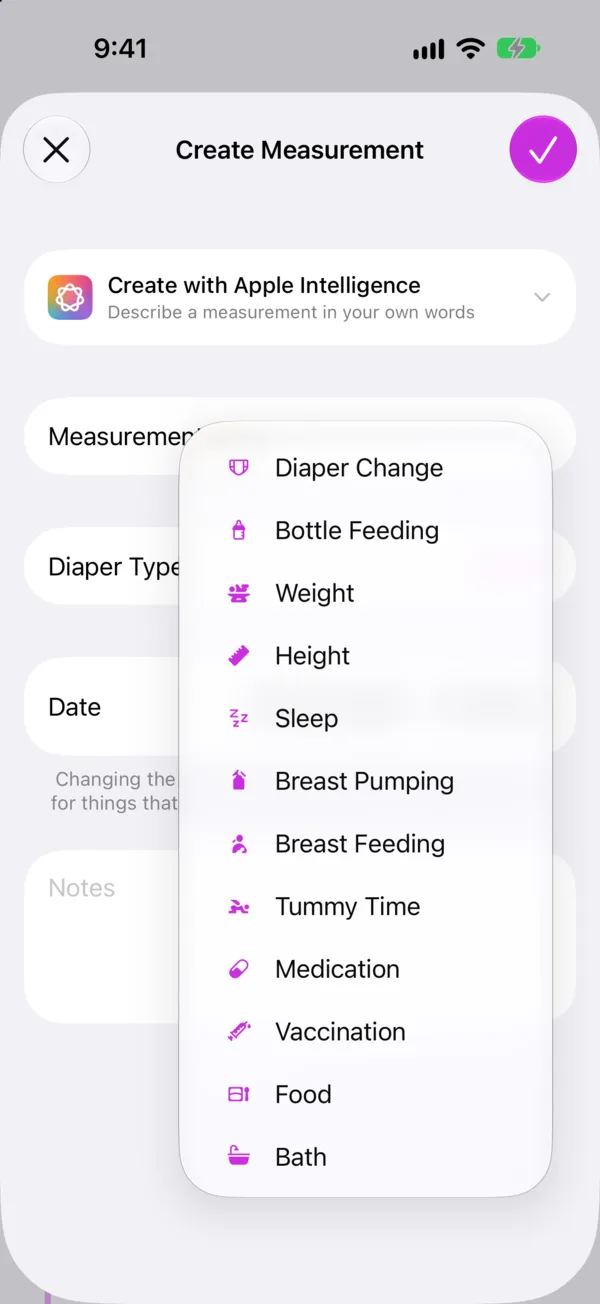
The Create Measurement screen listing all 12 kinds of entry, with Create with Apple Intelligence at the top

Timers that keep running Free

Start a timer for breastfeeding, sleep or tummy time and put your phone down.

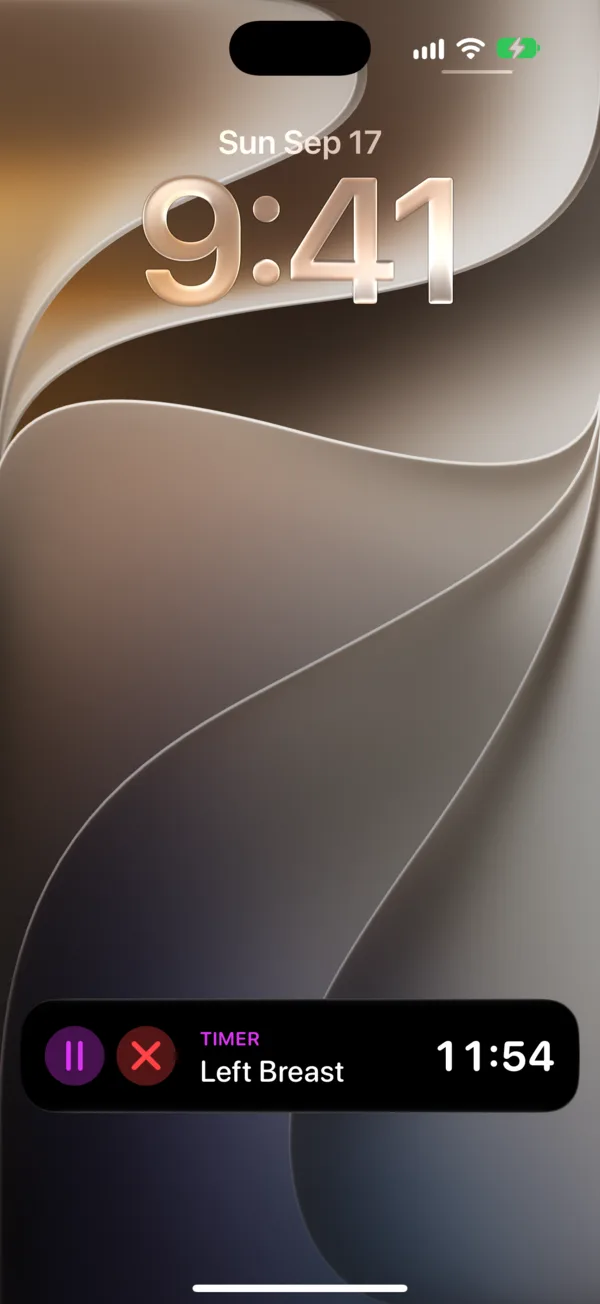
The timer shows on your Lock Screen and in the Dynamic Island. You can pause and resume it there, then save the entry or discard it, without opening the app. Breastfeeding timers track each side separately.

A left breast timer running as a Live Activity on the Lock Screen, with pause and discard buttons

Today at a glance Free

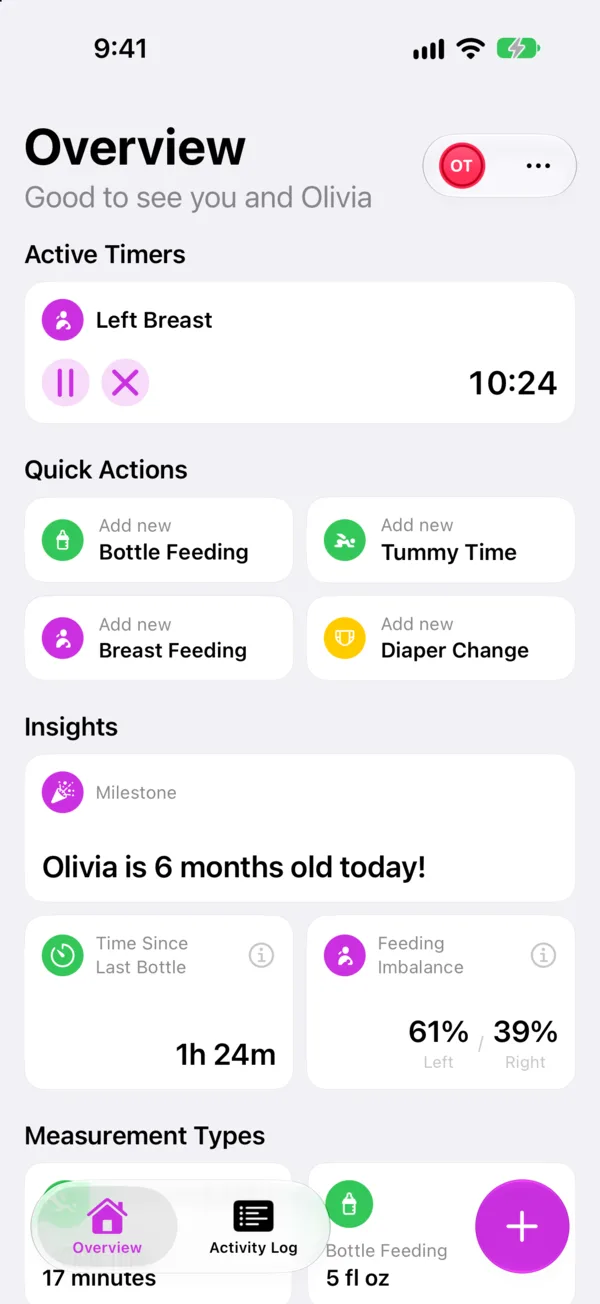
The Overview is the first screen you see, and it puts the next thing you're likely to need at the top.

  • Running timersEvery timer that's going, with its elapsed time.
  • Quick actionsButtons for the four kinds of entry you logged most recently.
  • Time since the last bottleSo you can tell at a glance when the next one might be due.
  • Feeding balanceA note when one side had more than 60% of yesterday's feeds or pumping.
  • MilestonesA message on each week and month birthday, such as "Olivia is 6 months old today!"

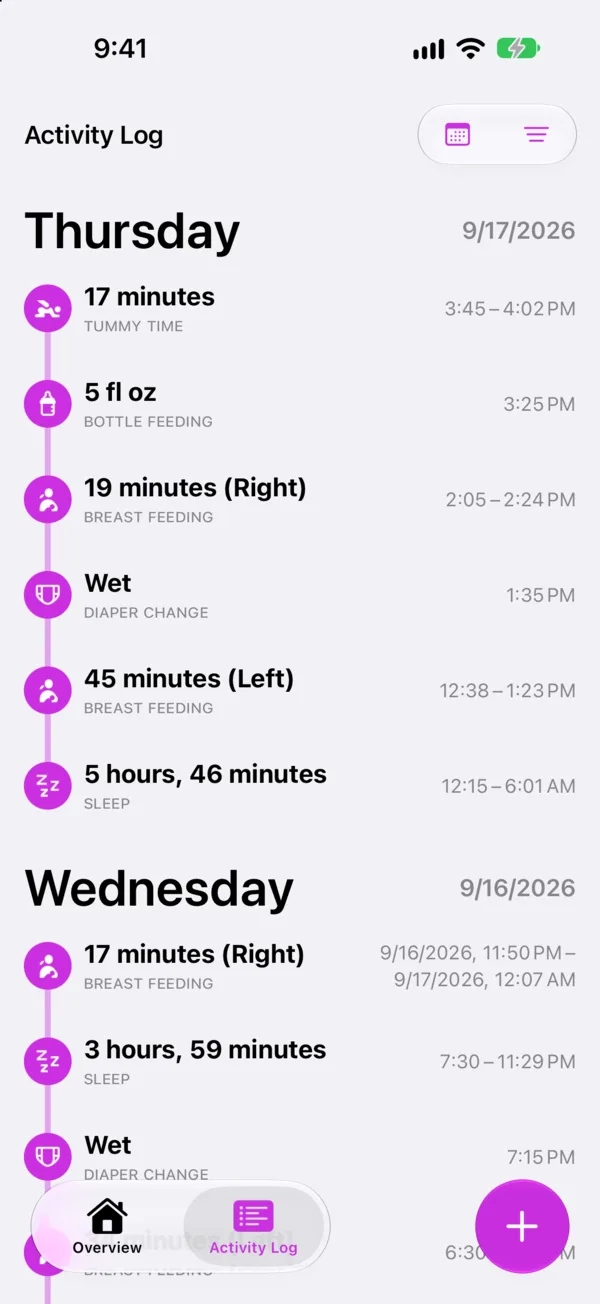
The Activity Log has everything else, grouped by day. Filter it by kind of entry, jump to any date, and press and hold an entry to edit or delete it.

The Overview with a left breast timer running, quick actions and insights
The Activity Log, showing a day of feeds, sleep and nappy changes

Charts and insights Plus

Each kind of entry has its own screen that turns your log into something you can read.

Weight and height
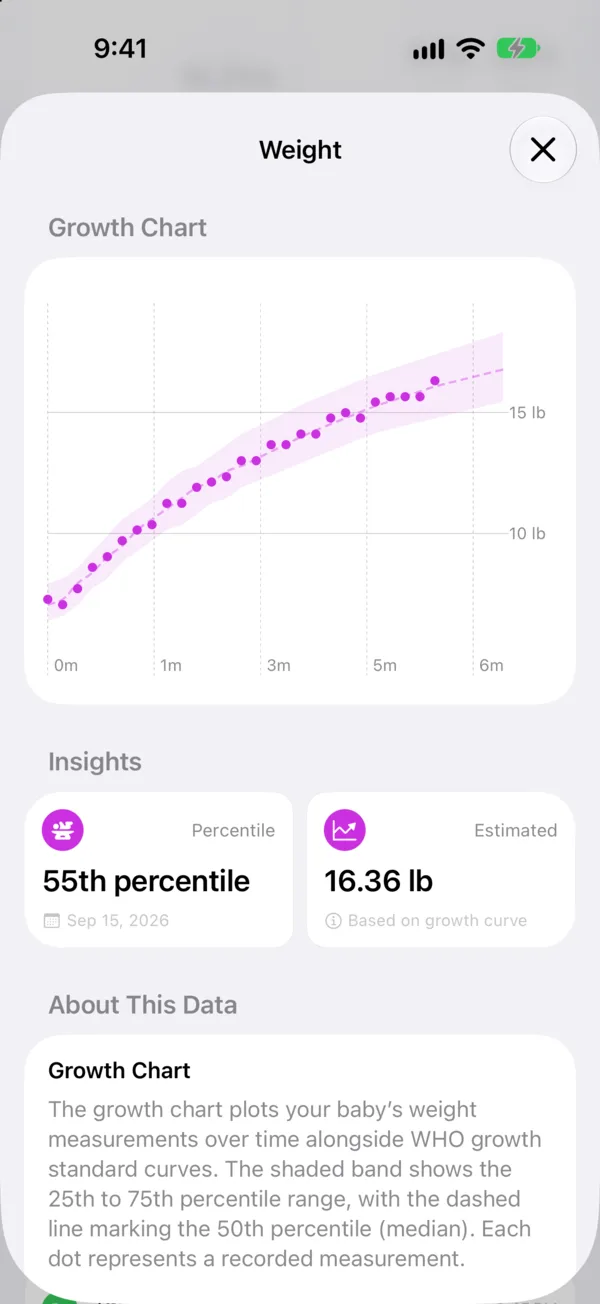
Your baby's entries against the WHO Child Growth Standards, with the median and the typical range from the 25th to the 75th percentile. Each entry shows its percentile. BabyTrack needs your baby's date of birth and sex for this.
Sleep
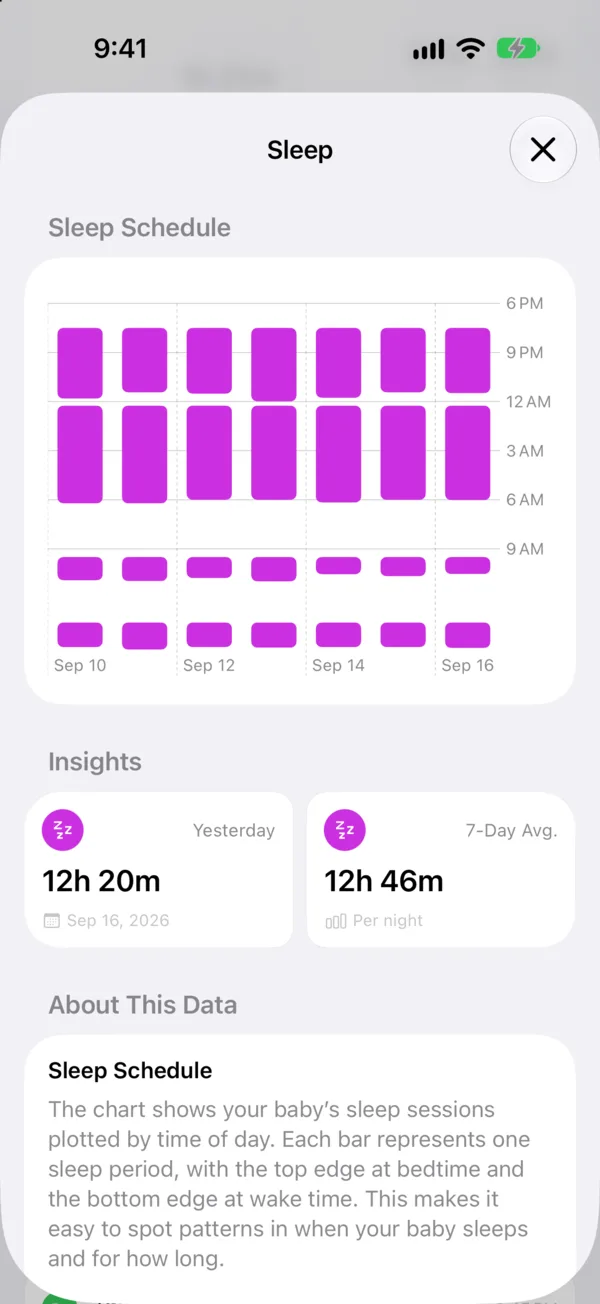
A sleep schedule for each night, that night's total and your 7-day average. Sleep that starts before 6am counts toward the night before.
Bottle
Today's total against what's usual by this time of day, yesterday against your typical range, and a daily amount guide based on weight for babies under 6 months.
Breastfeeding and pumping
The balance between left and right, and a 7-day average.
Nappies
When the last wet nappy and the last dirty nappy were.
Tummy time
Time each day, and a 7-day average.

Every chart screen also explains what its numbers mean.

A weight chart against the WHO typical range, with the baby at the 55th percentile
A week of sleep plotted by night, with yesterday's total and the 7-day average

Sharing and sync

Sync Free
Your log stays up to date on your own iPhone and iPad through iCloud. There's no account to create.
Family sharing Plus
Share a baby with a partner, grandparent or nanny from the menu on the Overview. They see the same log as it's updated. Only the person who shares needs Plus.
Several babies Free
Add as many as you need, each with a photo and a colour, and switch between them at the top of the app.

Export

Data export Free
Save your entries as CSV files for Numbers, Excel or Google Sheets, or as one JSON file. Choose which babies and which kinds of entry to include. You'll find it in Settings.
PDF summary Plus
A document covering the last 7, 14 or 30 days, to take to an appointment. Choose the sections: growth with its WHO chart, feeding, sleep, nappies, and medication and vaccinations. It prints on A4 or US Letter.

Log without opening the app Plus

Siri and Shortcuts
Add an entry, start a timer or end one. Say "Start BabyTrack timer", or build the actions into your own shortcuts.
Lock Screen widget
Shows when you last logged the kinds of entry you choose.

The details

Devices
iPhone and iPad with iOS 26 or iPadOS 26 or later. On iPad, BabyTrack uses the larger screen to show the list and the detail side by side.
Units
kg or lb, cm or inches, and ml, fl oz or US fl oz. Each can follow your device's settings instead.
Languages
English, German, Spanish, French and Italian.
Appearance
Light and dark, following your device's setting.

Free and Plus compared

Plus comes as a monthly or yearly subscription, or a one-time lifetime purchase. The app shows prices in your currency before you buy.

Feature Free Plus
Log every kind of entry, with no limits
Timers on the Lock Screen and in the Dynamic Island
Overview, Activity Log and milestones
Several babies
Sync between your own devices
Describe an entry with Apple Intelligence
CSV and JSON export
Growth charts and WHO percentiles
Sleep, feeding, nappy and tummy time insights
Family sharing
PDF summary
Siri, Shortcuts and the Lock Screen widget

Try it tonight

Free on the App Store, for iPhone and iPad with iOS 26 or later.

Download on the App Store